Rendering Textures
Shapes are great for roughing out mechanics, but at some point you'll want real art.
That's where Textures come in.
Textures are GPU-friendly images that you can draw, flip, rotate, and scale. Think of them as a prepared image the GPU keeps on hand (VRAM). You upload it once, then tell the renderer where and how to place it each frame.
Creating Textures
Loading an image into GPU memory isn't free. It's best to load once and reuse rather than creating textures on the fly:
texture = kn.Texture("image.png")
while kn.window.is_open():
    # Use texture in here
Beginner Tip:
If you need the same image multiple times (e.g. many enemies), reuse the same Texture object.
Drawing Textures
The simplest draw call renders the texture at the origin (0, 0).
Use a Transform to control position, rotation, and scale:
# Draw at origin with default transform
kn.renderer.draw(texture)

# Draw with custom transform
transform = kn.Transform(
    pos=kn.Vec2(150, 100),
    angle=kn.math.to_rad(30)
)
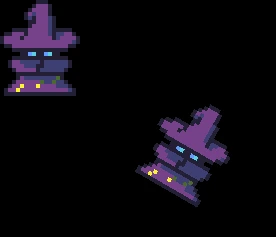
kn.renderer.draw(texture, transform)
Result:
Batching
Modern SDL3 backends (which we use) batch draw calls automatically if you draw the same texture consecutively. This keeps the GPU from doing expensive state changes.
# Best performance:
for i in range(5):
    transform = kn.Transform(pos=kn.Vec2(i * 40, 100))
    kn.renderer.draw(texture, transform)

# Do sparingly:
kn.renderer.draw(texA)
kn.renderer.draw(texB)
kn.renderer.draw(texA)
So, wherever possible, group similar textures together when drawing.
Atlases
If your game uses lots of small sprites (UI icons, sprite states, etc.), pack them into a single large texture called an atlas. This means:
- Only one texture bind (fewer GPU state changes)
- Faster draws when sprites share the same atlas
The renderer accepts a source rectangle to select a portion of the texture to draw.
# Load the atlas texture
atlas_texture = kn.Texture("atlas.png")

heart_src = kn.Rect(0, 0, 32, 32)
heart_transform = kn.Transform(pos=kn.Vec2(16, 16))

power_src = kn.Rect(32, 0, 32, 32)
power_transform = kn.Transform(pos=kn.Vec2(32, 32))

while kn.window.is_open():
    ...
    # Draw heart icon from atlas
    atlas_texture.clip_area = heart_src
    kn.renderer.draw(atlas_texture, heart_transform)

    # Draw power icon from atlas
    atlas_texture.clip_area = power_src
    kn.renderer.draw(atlas_texture, power_transform)
    ...
Texture atlas:

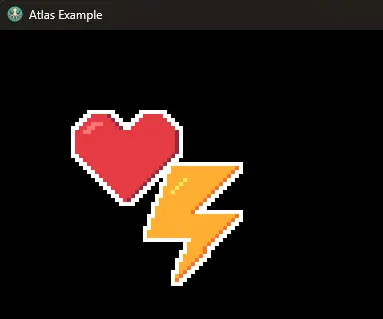
Result: