Vectors for Game Physics
Vectors are the backbone of game physics.
The Vec2 class gives you everything you need for 2D movement, collision response, and spatial calculations.
Creating Vectors
A Vec2 represents a point or direction in 2D space.
You can create them with x and y components, or as a zero vector.
position = kn.Vec2(100, 200)
velocity = kn.Vec2(-3)  # (-3, -3)
zero = kn.Vec2.ZERO  # (0, 0)
Access components with .x and .y:
>>> print(f"X: {position.x}, Y: {position.y}")
X: 100, Y: 200
Basic Movement
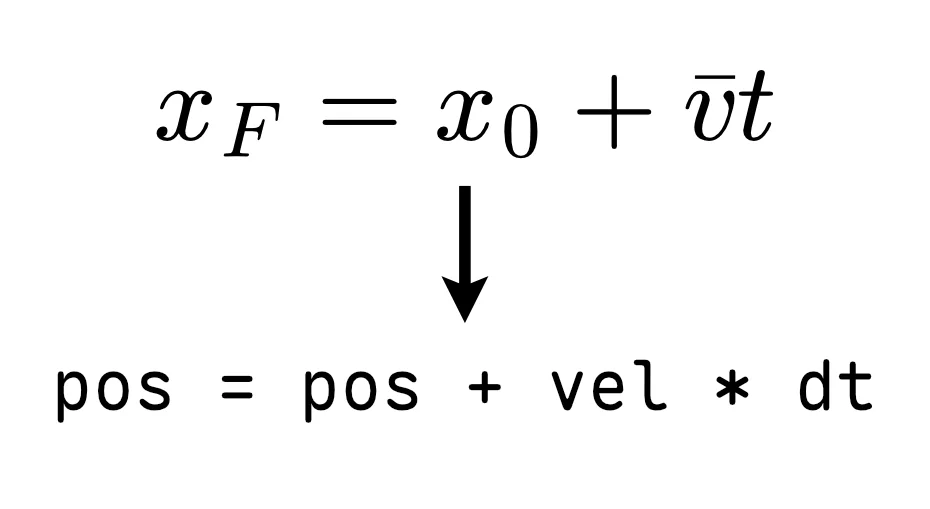
The simplest physics is moving an object by adding velocity to position each frame. Multiply velocity by delta time to keep movement frame-rate independent.
import pykraken as kn

kn.init()
kn.window.create("Movement Demo", 800, 600)
bg_color = kn.Color("#222")

circle = kn.Circle(400, 300, 20)
direction = kn.Vec2.RIGHT  # (1, 0)
speed = 200  # pixels per second

while kn.window.is_open():
    kn.event.poll()

    dt = kn.time.get_delta()

    # velocity = speed * direction
    # Optimization tip: Multiply the scalars first
    circle.pos += dt * speed * direction

    kn.renderer.clear(bg_color)
    kn.draw.circle(circle, kn.Color.WHITE)
    kn.renderer.present()

kn.quit()
Result:
Normalizing Vectors
A normalized vector (unit vector) has a length of 1. This is essential for consistent movement speed. Without it, diagonal movement is about 1.41x faster!
# Without normalization, diagonal is faster
direction = kn.Vec2(1, 1)  # length ≈ 1.414

# Normalize to get consistent speed
direction.normalize()  # new length = 1.0

# Now apply your desired speed
speed = 200
velocity = direction * speed
Use normalization whenever you need a pure direction without magnitude.
Dot Product
The dot product tells you how aligned two vectors are:
- Positive: Same general direction
- Zero: Perpendicular (90°)
- Negative: Opposite directions
forward = kn.Vec2.RIGHT  # (1, 0)
to_target = (target_pos - my_pos).normalized()

alignment = kn.math.dot(forward, to_target)

if alignment > 0.7:
    print("Target is in front")
elif alignment < -0.7:
    print("Target is behind")
else:
    print("Target is to the side")
Cross Product (2D)
In 2D, the cross product returns a scalar indicating rotation direction. Useful for determining which way to turn to face a target.
a = kn.Vec2(1, 0)
b = kn.Vec2(0, 1)

# Positive, meaning b is counter-clockwise from a
cross = kn.math.cross(a, b)